What's New in Elasticsearch 9.5: Search, AI, and Platform
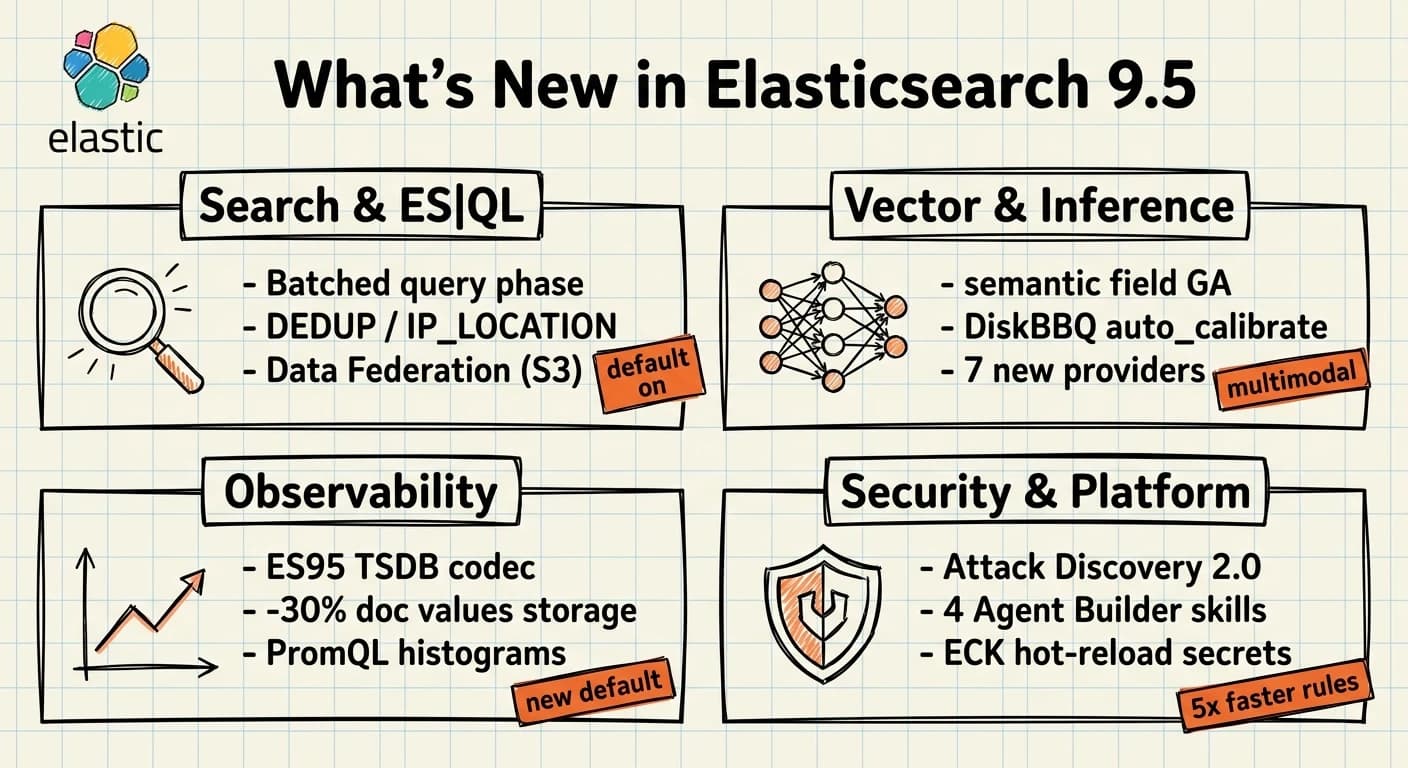
Elasticsearch 9.5 lands in the middle of a rapid release cadence. The prior two releases (9.3 and 9.4) added Agent Builder GA, GPU indexing GA, and DiskBBQ as the Enterprise default. 9.5 follows with GA promotions on several features that were previewing since early in the year, meaningful observability additions, and a significant ECK operator release that changes how Kubernetes-managed clusters handle secrets and namespace scoping.
Key Takeaways
- The
semanticfield type is now GA, with multimodal support (text, images, audio, video, PDF) through the Inference API (Elastic docs).- DiskBBQ gains an auto-calibration mode at merge time (
auto_calibrate: true) targeting 90% recall at k=10, plus a 20% AVX-512 int4 dot product improvement (Elastic release notes).- ES|QL adds Data Federation (Experimental) for querying S3 directly, FUSE command GA, DEDUP command, IP_LOCATION, and a batched query phase enabled by default that reduces shard round-trips (Elastic release notes).
- The new ES95 TSDB codec cuts doc values storage ~30% versus ES819 and becomes the default for new time series indices (Elastic release notes).
- ECK 3.5.0 adds hot-reload of secure settings without rolling restarts, dynamic namespace scoping, and mTLS for all Stack components (ECK release notes).
- Security 9.5 adds four new Agent Builder skills, Attack Discovery 2.0, MITRE ATT&CK v19.1 mappings, and 5x faster prebuilt rule installation (Security release notes).
This post focuses on the changes that matter for teams operating Elasticsearch at scale. For the 9.1-9.3 arc see What's New with Elasticsearch: Key Updates. For DiskBBQ and the full BBQ version history see BBQ and DiskBBQ: How Elasticsearch Compresses Vectors Without Sacrificing Search.
Search and ES|QL: What Changed?
Batched Query Phase — Fewer Round-Trips by Default
The most impactful query performance change in 9.5 has no configuration required. Searches targeting multiple shards on the same data node now batch those shards into a single round-trip per node, with partial reductions performed on the data node before sending results to the coordinating node. This reduces coordinator-side deserialization overhead for shard-heavy indices and is enabled by default via search.batched_query_phase (Elastic release notes).
The gain is most noticeable on clusters where many shards per data node is the norm — dense Observability deployments or indices that have been under-sized relative to node count. No mapping or query changes required.
ES|QL Data Federation — Query S3 Directly
Data Federation is listed as Experimental in 9.5, but it is worth knowing it exists. You can define external data sources backed by Amazon S3 and run ES|QL queries against them through a management UI in Stack Management, without moving data into Elasticsearch first. For ad-hoc analysis on cold data that does not justify a full reindex, this is a useful option — with the caveat that Experimental features are not covered by SLA and the API surface can change.
FROM external-s3-source::my_dataset
| WHERE timestamp > NOW() - 24h
| STATS count = COUNT(*) BY status_code
| SORT count DESC
| LIMIT 10
The external data source is created in Stack Management under Data Sources before it appears in ES|QL.
ES|QL Additions: FUSE, DEDUP, IP_LOCATION, Flattened Field Support
Several ES|QL commands graduate or arrive in 9.5:
FUSE (GA) — previously Tech Preview. Combines multiple standard queries into a single result stream. Useful when you need results from different query shapes without a union manually coded at the application layer.
DEDUP — removes duplicate rows from the result set on specified columns, comparable to SELECT DISTINCT. This has been one of the more-requested ES|QL additions for log deduplication use cases.
IP_LOCATION — enriches IP addresses with geographic metadata at query time, without a separate enrich pipeline.
Flattened field type + FIELD_EXTRACT() (Tech Preview) — ES|QL can now query flattened fields with sub-field expressions via the new FIELD_EXTRACT() function. This matters for dynamic-mapping-heavy indices where flattened fields are used to keep mapping growth in check.
FROM logs-*
| WHERE @timestamp > NOW() - 1h
| EVAL geo = IP_LOCATION(client.ip)
| DEDUP request.path, response.status_code
| STATS errors = COUNT(*) BY geo.country_name
| SORT errors DESC
AI-driven ES|QL completion (Kibana) — Kibana 9.5 adds inline ghost-text completion for ES|QL queries in Discover and Dev Tools. The assistant proposes the next clause as you type; Tab accepts. This sits on top of the existing AI assistant and requires an LLM connector configured in Kibana.
ES|QL Fast Mode — eligible STATS queries in Discover and Dashboards can run in a faster execution path. Toggled per session in the Discover toolbar; not all queries qualify.
Synonym Improvements
Three synonym improvements land together in 9.5: append mode for rule updates (append=true on the synonyms API), configurable per-filter limits with a 100,000 default, and support for multiple synonym sets per filter. For synonym-heavy deployments with many rules per field, the previous single-set limit per filter was a real constraint. The configurable limit and multi-set support remove that ceiling cleanly (Elastic release notes).
Vector Search and Inference
The semantic Field Type Goes GA — Including Multimodal
The semantic field type is now GA. It is distinct from semantic_text: semantic supports only dense vector embeddings and extends to multimodal inputs — text, images, audio, video, and PDF content passed through the Inference API (Elastic docs). semantic_text supports both dense and sparse vectors (ELSER) and works with text input only.
In practice: use semantic_text for text-heavy corpora where you want hybrid search to work across the same field. Use semantic for multimodal use cases where you need a single embedding space covering text and image inputs together.
PUT /product-catalog
{
  "mappings": {
    "properties": {
      "description": {
        "type": "semantic_text",
        "inference_id": "my-elser-endpoint"
      },
      "product_image": {
        "type": "semantic",
        "inference_id": "my-multimodal-embedding-endpoint"
      }
    }
  }
}
The semantic field type handles chunking and embedding generation at ingest time — the same model that embeds images can embed query text, returning results where image content is ranked against a text query.
DiskBBQ: Auto-Calibrate + 20% AVX-512 Gain
Two additions to DiskBBQ in 9.5:
auto_calibrate (GA) — Elasticsearch selects encoding, oversampling, and preconditioning per-segment at merge time to target 90% recall at k=10. Segments with fewer than 10,000 vectors fall back to the configured bits value. This is the right default for teams without labelled recall benchmarks (Elastic docs):
"index_options": {
  "type": "bbq_disk",
  "auto_calibrate": true
}
The AVX-512 int4 dot product kernel was re-tuned for a 20% throughput gain on x86 hardware. Combined with the AVX-512 f32 dot product and squared L2 kernels also added in 9.5, scoring throughput on compatible CPUs improves without configuration changes.
For the full BBQ and DiskBBQ decision guide, version history, and mapping examples, see BBQ and DiskBBQ: How Elasticsearch Compresses Vectors Without Sacrificing Search.
Inference API: New Providers and Modalities
The inference API expands in 9.5 with several new integrations:
- Anthropic chat_completion —
chat_completiontask type added, enabling Claude models as the LLM backend for Agent Builder tools. - Audio, video, and PDF embedding inputs — the inference API now accepts these content types for embedding generation. Combined with the
semanticfield GA, this enables indexed retrieval over multimedia content. - OpenAI OAuth2 — OAuth2 authentication for OpenAI inference endpoints, replacing API key authentication where OAuth2 is required.
- Jina multimodal input format — multimodal content support via Jina inference endpoints.
- Google Vertex AI global endpoint — connects to the Vertex AI global endpoint in addition to regional endpoints.
- Elastic Service multimodal rerank — the hosted Elastic Inference Service now supports multimodal reranking via the
reranktask type. - Jina Embeddings v5 — Kibana's documentation installation now prefers Jina Embeddings v5 over v3. For teams building custom semantic search on Kibana documentation, v5 is the current recommended model.
Token usage tracking for inference calls arrives in Kibana 9.5 with a dashboard that shows per-endpoint token consumption. Useful for cost attribution on shared Elastic Cloud deployments.
Observability: TSDB Codec and PromQL
ES95 TSDB Codec — 30% Less Storage by Default
The ES95 codec is now the default for new time series data streams. On host metrics data, it reduces total doc values storage by approximately 30% versus ES819, which was the prior default (Elastic release notes). The codec name encodes the version — "ES" for Elasticsearch, "95" for major 9, minor 5. Existing indices keep their prior codec; the 30% reduction applies to newly created backing indices going forward.
For teams running large host metrics workloads — infrastructure monitoring at hundreds of hosts — this is one of the highest-leverage changes in 9.5 that requires zero configuration. The compression gain happens at index creation time on new backing indices created after upgrading. Roll your data stream's hot index after upgrading and the next backing index will use ES95.
TSDB: Native Metric Temporality and Backfilling
TSDB now handles cumulative and delta metric temporality natively. Counter and histogram metrics ingested through the OTLP endpoint no longer require pre-conversion to delta before ingest — the backend applies the conversion. Combined with OTLP logs and traces being enabled by default, this removes a common configuration step for teams migrating from Prometheus-based collection.
TSDB backfilling is also addressed in 9.5: bulk requests that create documents with @timestamp values outside the boundaries of existing backing indices no longer fail outright. The new data_stream.past_tsdb_index_creation_enabled setting controls this behaviour (Elastic release notes).
PromQL Additions
For teams querying via PromQL:
- Exponential histogram support —
increase(),sum(), andhistogram_quantile()now work overexponential_histogramfields with native histogram semantics. - PromQL metadata API —
GET /_prometheus/api/v1/metadataendpoint, compatible with Prometheus-standard metadata queries. - UNION set operator — top-level
or(union) set operator for combining metric series. - Histogram aggregation functions —
histogram_count,histogram_sum,histogram_avg.
DLM Frozen Tier Support
Data stream lifecycle (DLM) now manages the frozen tier. Set frozen_after on a data stream's lifecycle configuration and DLM moves aging backing indices to frozen automatically — with the frozen phase visible in the ILM wizard in Kibana. For data streams where cold data needs to remain queryable but RAM cost is a concern, DLM-managed frozen replaces the need for a separate ILM policy alongside a DLM policy (Elastic release notes).
Columnar Index Modes (Tech Preview)
Two new index modes arrive in 9.5 as Tech Preview: columnar and logsdb_columnar. Both store all fields as doc values only, skipping the inverted index and row-oriented storage that standard indices use. The result is a significantly smaller storage footprint for write-heavy workloads that do not need full-text search or high-frequency term lookups (Elastic release notes).
logsdb_columnar applies the same columnar layout on top of the existing LogsDB defaults — automatic timestamp handling, host and log message extraction, and the ~60% log storage savings that LogsDB already provides. Adding the columnar layer on top targets analytics-heavy log workloads where aggregations dominate over point-in-time doc retrieval.
Both modes support flat mappings, multi-value preservation, and optional single-value or required-value enforcement per field. Because these are Tech Preview, the mapping and API surface may change before GA. Evaluate on non-production indices before committing.
PUT /analytics-index
{
  "settings": {
    "index": { "mode": "columnar" }
  }
}
For storage configuration and ILM best practices, see Elasticsearch Stack Storage Optimization.
Security 9.5: Four New Agent Builder Skills, Attack Discovery 2.0
Agent Builder Skills for Security
Four new built-in Agent Builder skills ship in Elastic Security 9.5, bringing AI-assisted workflow automation into the SOC (Security release notes):
| Skill | What It Does |
|---|---|
recommend-prebuilt-rules | Recommends which prebuilt rules to install based on the data in the environment |
find-security-rules | Discovers, filters, and counts detection rules via natural language |
alert-triage | Ranks the open alert queue by combining risk factors — entity criticality, alert severity, signal context |
pci-compliance | PCI DSS v4.0.1 scope discovery and compliance check tools |
These skills extend the Agent Builder with domain-specific reasoning over your security data without requiring custom prompt engineering.
Attack Discovery 2.0
Attack Discovery moves to a workflow-based generation model in 9.5, integrating with the Alerts framework scheduling. This means Attack Discovery runs on a schedule, not just on demand, and produces findings that can be reviewed asynchronously. Bulk enable, disable, and delete actions for schedules are included.
A new alert analysis managed workflow gathers alert context, sends it to the configured LLM, and writes summaries back as notes and tags on the alerts. This composes with the cases integration — attachments from the workflow analysis land alongside the alert timeline.
Detection Rules
Prebuilt rule installation is approximately 5x faster in 9.5, with an improved bulk-operation path replacing the prior sequential installation logic (Security release notes). For environments with hundreds of prebuilt rules, this removes a significant delay from the initial setup and rule-update workflows.
Detection rule changes history is now GA. A dedicated changes-history page shows an infinite-scroll timeline of every rule revision, with JSON diff between revisions. Rules can be restored to a previous state from the history view. MITRE ATT&CK mappings update to v19.1.
Elastic Defend
Key Defend additions in 9.5:
- PowerShell runscript —
runscriptresponse action supports PowerShell scripts on Windows endpoints. - Cancel response action — pending response actions can be cancelled before execution.
- Upload limit raised to 200 MiB — from the previous default.
- CCS support — Elastic Defend agents can use a remote Elasticsearch output with cross-cluster search.
- AI-agent process attribution — process tree enrichment that attributes process activity to AI agent parents, useful for detecting unexpected execution chains from LLM-driven processes.
- macOS 27 experimental — early support added.
Osquery gains CSV, JSON, and NDJSON export from query results, and recurrence-based scheduling with Daily or Custom schedule options for Osquery packs.
Platform: Agent Builder, Workflows, and Connectors
Agent Builder: Concurrent Conversations and Fast Model Routing
Agent Builder in Kibana 9.5 adds three operational improvements:
Concurrent conversations — multiple Agent Builder sessions run simultaneously with per-conversation status indicators. Previously, running a second conversation while one was active required a separate browser session.
Fast model routing — low-effort Agent Builder operations (simple lookups, reformatting tasks) can route to a configurable fast model with automatic fallback to the primary model for complex reasoning. This reduces per-query latency and cost on mixed workloads where not every tool call requires the full model.
Tracing enabled by default — the trace waterfall for each Agent Builder response is now recorded and viewable without enabling a debug mode. Useful for understanding which tools were called, in what order, and with what inputs.
Clarifying questions — agents can pause a conversation to ask up to five multiple-choice questions before acting on ambiguous input.
Skill creation in chat — skills can now be drafted, previewed as chat attachments, and saved from within a conversation. Previously this required the separate skill editor in the Agent Builder configuration UI.
Workflows: Human-in-the-Loop and Version History GA
Elastic Workflows adds two significant capabilities in 9.5:
Human-in-the-loop approval steps — a workflow step can pause execution and wait for an external approval (via the Kibana UI or via a configured integration). This enables automation where a human review checkpoint is a compliance requirement.
Version history GA — every workflow save is recorded. The version history lets you view the diff between any two versions and restore a previous state. This was a gap that made Workflows awkward for teams using IaC-style workflows; version history closes it.
Step-level if conditions are also added, enabling conditional skip logic per step rather than requiring a separate parallel branch.
New Connectors in 9.5
Seven new connectors arrive in Kibana 9.5:
| Connector | Key Capabilities |
|---|---|
| OneDrive | Search files, browse drives, read file content |
| Box | Search files and folders, read file content |
| Outlook | Search email, download attachments |
| Snowflake | SQL queries, database and table exploration |
| Azure Blob Storage | List containers and blobs, read blob content |
| HubSpot | Contacts, companies, deals, tickets, engagements |
| Sublime Security | Investigate and act on email threats |
Kibana Operational Changes
Dashboard panel limit raised from 100 to 1,000 combined panels, sections, and controls — the 100 limit was a genuine blocker for dense NOC-style dashboards.
Dashboards and Visualizations APIs go GA. These APIs have been available in preview for several releases; GA means stable contracts and SLA coverage.
Cases as Data is now on by default. Cases data (activity, attachments, notes) is indexed and queryable via ES|QL and standard search. GET /_prometheus/api/v1/metadata observable extraction from cases is also automated in 9.5 — observables are extracted when alerts are added to cases via the API, workflows, or Agent Builder.
Dev Tools JQ filtering — Dev Tools Console responses can be filtered with JQ expressions inline, without piping output to a separate terminal.
Display language selection (Beta) — Kibana UI language can now be changed per user from the profile menu.
ECK 3.5.0: What Changed for Kubernetes Operators
ECK 3.5.0 ships as the companion operator for the Elasticsearch 9.5 era. Several changes affect cluster management:
Hot-Reload Secure Settings (Elasticsearch 9.5+)
Previously, updating spec.secureSettings in an Elasticsearch CRD triggered a rolling restart of the cluster. ECK 3.5.0 adds file-based delivery of secure settings that Elasticsearch hot-reloads without a restart, available for Elasticsearch 9.5.0 and later. Opt in per cluster:
metadata:
  annotations:
    eck.k8s.elastic.co/file-based-secure-settings: "true"
For clusters where keystore updates are frequent — rotating credentials, updating S3 repository settings — this removes the rolling restart from the change lifecycle.
Dynamic Namespace Scoping (Enterprise)
ECK can now scope its namespace watch using label selectors, replacing the static namespace list in the operator configuration. Namespaces matching the label selector are picked up and dropped live, without restarting the operator. This is an Enterprise feature (ECK release notes).
Pause Orchestration
A new eck.k8s.elastic.co/pause-orchestration annotation suspends spec-driven orchestration on a cluster while keeping certificate rotation, service reconciliation, user management, and health monitoring active. Useful for maintenance windows or debugging scenarios where you need the cluster running but want to stop ECK from reacting to spec changes temporarily.
mTLS Expansion to All Stack Components
All Stack components that connect to Elasticsearch — APM Server, Beats, Enterprise Search, Elastic Maps Server, Logstash, standalone Elastic Agent, and Fleet Server — now automatically receive ECK-managed client certificates. Previously mTLS was limited to a subset of components.
Fleet Server mTLS for Elastic Agents is also available in ECK 3.5.0 (Enterprise feature): Fleet Server can require client certificates from connecting Elastic Agents.
Elasticsearch Roles in StackConfigPolicy
Custom Elasticsearch roles can now be defined directly in StackConfigPolicy via the securityRoles field. ECK merges the definitions into the roles.yml mounted on each pod and Elasticsearch hot-reloads them without a pod restart:
apiVersion: stackconfigpolicy.k8s.elastic.co/v1alpha1
kind: StackConfigPolicy
spec:
  securityRoles:
    my-custom-role:
      cluster:
        - monitor
      indices:
        - names: ["logs-*"]
          privileges: ["read"]
Reduced Operator Memory Footprint
ECK's controller-runtime cache is now automatically scoped to ECK-labelled workload resources. An optional --restrict-watched-resources flag further narrows the cache for Secrets, Services, and ConfigMaps — useful in large clusters where many non-ECK resources exist.
Reindex Resilience
Asynchronous reindex operations now survive graceful node shutdowns. Previously, a reindex that hit a shutdown event would fail and require a restart from the beginning. In 9.5, the operation resumes from where it left off. The implementation also switches from scroll to the point-in-time API, and adds dedicated management APIs for monitoring and controlling async reindex runs (Elastic release notes).
This matters most for teams running large reindex operations as part of mapping migrations or quantization changes.
Choosing What to Deploy
| If you are... | 9.5 change to act on |
|---|---|
| Running DiskBBQ on Enterprise | Enable auto_calibrate: true on new fields |
| Building multimodal search | Use semantic field type (now GA) with a multimodal inference endpoint |
| Indexing time series metrics via OTLP | Upgrade to get ES95 codec (30% storage reduction) and native temporality handling |
| Running ECK | Upgrade to 3.5.0; add file-based secure settings annotation on 9.5 clusters |
| Operating a SOC on Elastic Security | Review the four new Agent Builder skills and Attack Discovery 2.0 schedule setup |
| Using Workflows | Enable human-in-the-loop steps; move to version history for change tracking |
| Building on connectors | Seven new connectors available (OneDrive, Box, Outlook, Snowflake, Azure Blob, HubSpot, Sublime) |
| Querying logs with ES | QL |
For the full AI platform capabilities, see Elasticsearch AI Platform. For vector search at scale across all deployment types, see Elasticsearch at Scale.
FAQ
Do I need to reindex to get the ES95 TSDB codec benefits?
No manual reindex is required. The ES95 codec applies automatically to new backing indices created after upgrading to 9.5. To force existing backing indices to use the codec, roll the data stream to create a new active index — the new backing index picks up ES95. Older indices retain their existing codec until they are deleted by ILM or DLM.
Is ES|QL Data Federation production-ready?
No. Data Federation is marked Experimental in 9.5, meaning the API surface can change without notice and it is not covered by production SLAs. It is suitable for evaluation and internal tooling. Wait for GA before building production workflows on top of it.
What is the difference between semantic and semantic_text fields?
semantic_text supports both dense and sparse vector embeddings (including ELSER), handles text input only, and is designed for hybrid search where the same field indexes both BM25 and semantic representations. semantic supports only dense vector embeddings but extends to multimodal input — text, images, audio, video, and PDF. Use semantic_text for text search. Use semantic when your retrieval needs to span multiple content modalities. Both are now GA.
Does the ECK hot-reload secure settings feature require any Elasticsearch config changes?
The annotation (eck.k8s.elastic.co/file-based-secure-settings: "true") is the only required change at the Kubernetes level. Elasticsearch 9.5+ receives the secret via a mounted file and hot-reloads it automatically. No changes to elasticsearch.yml are needed. The feature is opt-in — clusters without the annotation continue to use the rolling-restart delivery path.
How does the Attack Discovery 2.0 schedule interact with existing Attack Discovery runs?
Attack Discovery 2.0 converts the on-demand generation into a workflow-based process with alerting-framework scheduling. Existing manual invocations still work, but the scheduling feature enables automated, recurring generation. Existing Attack Discovery results are not migrated to the 2.0 model; the new schedule runs produce new findings in the 2.0 format. Check the schedule configuration in the Attack Discovery UI after upgrading.
Is Elastic Defend's AI-agent process attribution related to Agent Builder?
The feature adds process tree enrichment that marks processes spawned by or attributed to AI agent runtimes (for example, processes started by an LLM-driven application). It is useful for detecting unexpected execution chains from AI applications running on endpoints — not directly related to Agent Builder in Kibana, though the terminology overlaps. It operates at the Elastic Defend host-level monitoring layer.
Release notes for all components: Elasticsearch · Kibana · Elastic Security · ECK