Elasticsearch LDAP Auth on ECK: OpenLDAP, AD, and Entra ID
Elasticsearch LDAP Authentication on ECK: OpenLDAP, Active Directory, and Entra ID
Elasticsearch ships with three authentication realms that matter in enterprise environments: native, file, and ldap (plus the dedicated active_directory realm). The native realm is fine for small teams. Once you are past a handful of engineers or operating under compliance requirements, you need users and groups to come from the directory your organisation already manages.
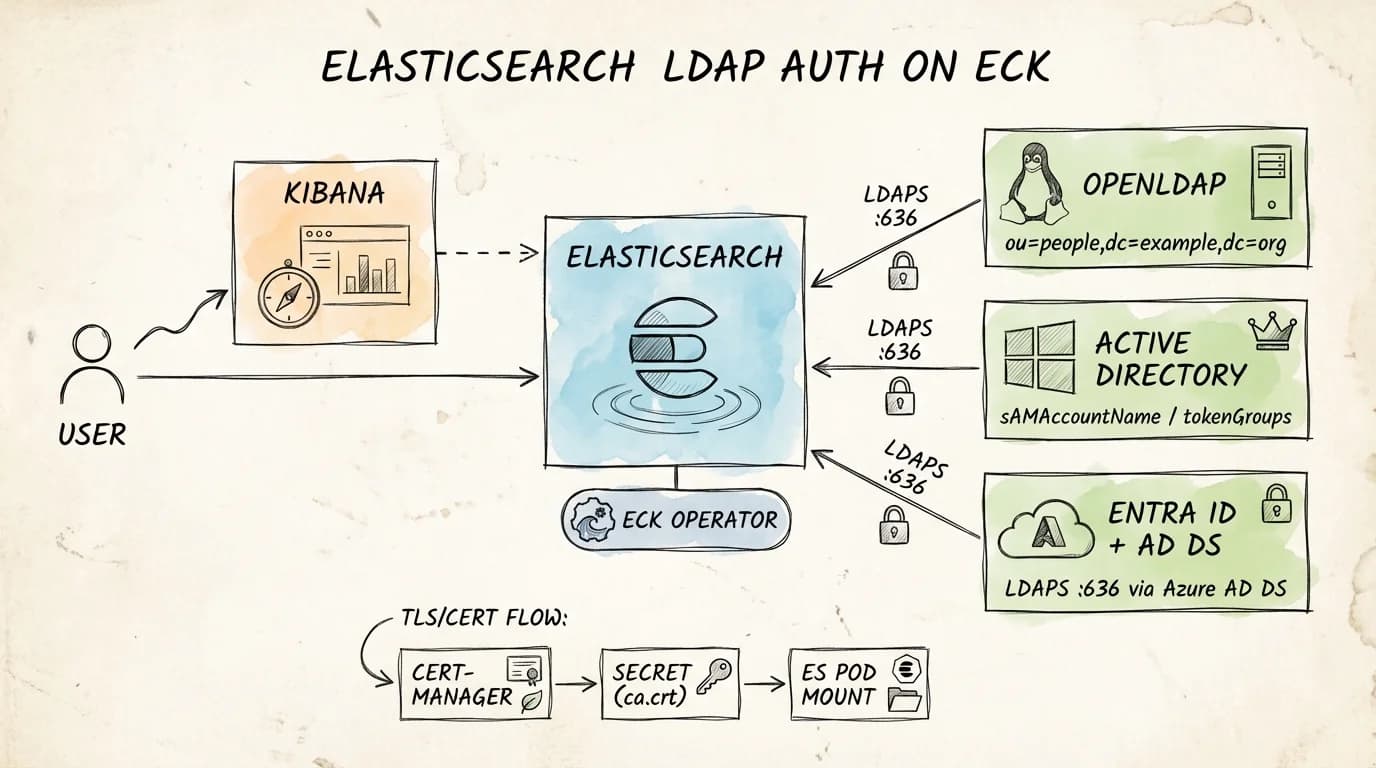
This post covers exactly that: how to configure the Elasticsearch LDAP realm on ECK, what changes when your directory source is Active Directory instead of OpenLDAP, and what you need to know about Entra ID (formerly Azure AD). It references a reproducible lab that brings up a full k3d cluster (ECK, OpenLDAP over LDAPS, cert-manager PKI, Kibana, and working role mappings) with a single make up.
Key Takeaways
- Elasticsearch LDAP realm (
ldap) uses user_search mode or DN templates; both work, but user_search is more flexible with heterogeneous directories.- The dedicated
active_directoryrealm auto-resolves groups viatokenGroups; you do not needgroup_search.base_dn.- Entra ID (cloud) has no native LDAP endpoint. You need Azure AD Domain Services to expose LDAPS; the Elasticsearch config then mirrors standard LDAP realm settings.
- On ECK, bind passwords go into a Kubernetes Secret referenced via
spec.secureSettings, never in the Elasticsearch config map.verification_mode: fullrequires the CA cert mounted into the Elasticsearch pod and the LDAP server cert SAN matching the URL hostname exactly.- Role mappings via file (
role_mapping.yml) are reloaded automatically every 5 seconds and survive API outages; use them for superuser and admin roles.
The Lab: What It Provisions
The reference repo (es-ldap-eck-deployment) targets a local developer workstation. It provisions:
- k3d cluster (
lab-sso) with ingress-nginx - cert-manager with a self-signed root CA and a
ClusterIssuer - ECK operator (tested against ECK 2.16.1)
- Elasticsearch (2-node, tested on 8.19.11 and 9.2.5) with an LDAP realm configured
- Kibana — TLS-terminated through ingress
- OpenLDAP — LDAPS on port 636, seeded with test users and groups
- phpLDAPadmin — browser UI for inspecting the directory
The one-shot bring-up is:
make up
# Override versions at runtime:
make up ES_VERSION=9.2.5 ECK_VERSION=2.16.1
Endpoints resolve via sslip.io against your detected host IP:
Kibana:         https://kibana.<HOST_IP>.sslip.io
Elasticsearch:  https://es.<HOST_IP>.sslip.io
LDAP UI:        https://ldap-ui.<HOST_IP>.sslip.io
A preflight check (scripts/validate_version.sh) verifies that Docker image tags exist for both docker.elastic.co/elasticsearch/elasticsearch:<ES_VERSION> and docker.elastic.co/kibana/kibana:<ES_VERSION> before applying any manifests.
LDAP Directory Structure
The lab seeds OpenLDAP with a minimal LDIF:
dn: ou=people,dc=example,dc=org
objectClass: organizationalUnit
ou: people

dn: ou=groups,dc=example,dc=org
objectClass: organizationalUnit
ou: groups

dn: uid=jane,ou=people,dc=example,dc=org
objectClass: inetOrgPerson
cn: Jane Doe
sn: Doe
uid: jane
mail: [email protected]
userPassword: Password123!

dn: cn=es-users,ou=groups,dc=example,dc=org
objectClass: groupOfNames
cn: es-users
member: uid=jane,ou=people,dc=example,dc=org
Two OUs: people and groups. One user (jane) in one group (es-users). Group membership uses the groupOfNames objectClass with member attributes pointing to user DNs. This is the standard OpenLDAP pattern.
Elasticsearch LDAP Realm Configuration (OpenLDAP)
The LDAP realm is configured inline in the Elasticsearch CRD under spec.nodeSets[].config. The key settings:
# manifests/elastic/elasticsearch.yaml (excerpt)
spec:
  version: __ES_VERSION__
  secureSettings:
    - secretName: es-ldap-bind-secret        # bind password injected via ECK keystore
  nodeSets:
    - name: default
      count: 2
      config:
        xpack.security.authc.realms.file.file1.order: 0
        xpack.security.authc.realms.native.native1.order: 1
        xpack.security.authc.realms.ldap.ldap1.order: 2
        xpack.security.authc.realms.ldap.ldap1.url: "ldaps://ldap.lab.svc.cluster.local:636"
        xpack.security.authc.realms.ldap.ldap1.bind_dn: "cn=admin,dc=example,dc=org"
        xpack.security.authc.realms.ldap.ldap1.user_search.base_dn: "ou=people,dc=example,dc=org"
        xpack.security.authc.realms.ldap.ldap1.user_search.filter: "(uid={0})"
        xpack.security.authc.realms.ldap.ldap1.group_search.base_dn: "ou=groups,dc=example,dc=org"
        xpack.security.authc.realms.ldap.ldap1.files.role_mapping: "/usr/share/elasticsearch/config/role-mappings/role_mapping.yml"
        xpack.security.authc.realms.ldap.ldap1.ssl.certificate_authorities:
          - "/usr/share/elasticsearch/config/ldap-certs/ca.crt"
        xpack.security.authc.realms.ldap.ldap1.ssl.verification_mode: full
A few decisions worth noting:
Realm ordering (order: 0/1/2). Elasticsearch walks realms in order on each authentication request. file first ensures the built-in emergency elastic user (stored in the file realm) always works even when LDAP is unreachable. native second covers any API-created users. ldap third handles directory-sourced logins. This ordering is not optional. Misconfigured ordering is a common source of authentication fallthrough issues.
user_search.filter: "(uid={0})". The {0} placeholder is substituted with the username submitted at login. For OpenLDAP this maps to the uid attribute. This is the user_search mode. Elasticsearch first binds as the admin (bind_dn), searches for the user, then re-binds as that user to verify the password.
group_search.base_dn. Elasticsearch walks the groups OU and checks for member attributes matching the authenticated user DN. The resolved group DNs are stored in ldap_groups metadata on the authentication token, which role mappings then inspect.
The Bind Password: ECK Secure Settings
The bind password never appears in the Elasticsearch config. It lives in a Kubernetes Secret:
# manifests/elastic/elastic-ldap-realm-config.yaml
apiVersion: v1
kind: Secret
metadata:
  name: es-ldap-bind-secret
  namespace: lab
type: Opaque
stringData:
  xpack.security.authc.realms.ldap.ldap1.secure_bind_password: "Admin123!"
ECK reads all Secrets listed under spec.secureSettings and injects their keys into the Elasticsearch keystore on each pod before the process starts. If you update the Secret, ECK detects the change and rotates the keystore entry without a rolling restart in most cases (ECK secure settings docs).
The secret key name must exactly match the xpack.security.* keystore setting name; this is the namespace ECK uses to call elasticsearch-keystore add internally. A typo here silently uses no bind password and causes every LDAP bind to fail with a generic authentication error that looks unrelated to secrets.
TLS: The CA Mount Chain
LDAPS with verification_mode: full requires that Elasticsearch can verify the LDAP server's certificate chain and that the server cert's SAN matches the hostname in the url setting.
The lab uses a 2-level PKI:
cert-manager (root CA: lab-root-ca)
    └── lab-ca-issuer (ClusterIssuer)
            └── ldap-ldaps-cert (Certificate)
                    ├── tls.crt  (LDAP server leaf cert)
                    ├── tls.key  (LDAP server private key)
                    └── ca.crt   (root CA — trust anchor for clients)
The cert-manager Certificate for LDAP:
# manifests/cert-manager/cert-ldap.yaml
spec:
  secretName: ldap-ldaps-tls
  commonName: ldap.lab.svc.cluster.local
  dnsNames:
    - ldap.__HOST_IP__.sslip.io
    - ldap-ui.__HOST_IP__.sslip.io
    - ldap.lab.svc
    - ldap.lab.svc.cluster.local
The SAN ldap.lab.svc.cluster.local must match the hostname in the Elasticsearch realm URL (ldaps://ldap.lab.svc.cluster.local:636). A mismatch here causes a TLS handshake failure. Elasticsearch logs it as PKIX path building failed, not an LDAP error.
The ca.crt from the ldap-ldaps-tls Secret is mounted into each Elasticsearch pod:
# Elasticsearch CRD podTemplate (excerpt)
volumeMounts:
  - name: ldap-ca
    mountPath: /usr/share/elasticsearch/config/ldap-certs
    readOnly: true
volumes:
  - name: ldap-ca
    secret:
      secretName: ldap-ldaps-tls
      items:
        - key: ca.crt
          path: ca.crt
Elasticsearch reads the CA at startup and uses it to validate the LDAP server's presented certificate on every LDAPS connection.
Authentication Flow (Sequence)
When jane logs into Kibana:
1. jane submits username/password to Kibana
2. Kibana forwards credentials to Elasticsearch /_security/_authenticate
3. ES LDAP realm (ldap1, order=2) picks up the request
4. ES opens TLS connection to ldap.lab.svc.cluster.local:636
   → verifies server cert chain against ca.crt
   → verifies SAN hostname match (verification_mode=full)
5. ES binds as admin (bind_dn) over LDAPS
6. ES searches: (uid=jane) under ou=people,dc=example,dc=org → finds UID
7. ES searches groups under ou=groups,dc=example,dc=org → finds cn=es-users
8. ES re-binds as uid=jane,ou=people,dc=example,dc=org with submitted password
   → LDAP verifies the password
9. ES maps cn=es-users → kibana_admin + superuser via role_mapping.yml
10. ES returns auth success; realm metadata includes ldap_dn and ldap_groups
You can verify this directly:
HOST_IP=$(./scripts/detect_host_ip.sh)
curl -k -u jane:Password123! \
  "https://es.${HOST_IP}.sslip.io/_security/_authenticate"
Expected response:
{
  "username": "jane",
  "roles": ["kibana_admin", "superuser"],
  "metadata": {
    "ldap_dn": "uid=jane,ou=people,dc=example,dc=org",
    "ldap_groups": ["cn=es-users,ou=groups,dc=example,dc=org"]
  },
  "authentication_realm": {"name": "ldap1", "type": "ldap"},
  "authentication_type": "realm"
}
Role Mapping
The lab uses file-based role mapping, mounted via a Kubernetes Secret:
# manifests/elastic/role-mapping.yaml
stringData:
  role_mapping.yml: |
    kibana_admin:
      - "cn=es-users,ou=groups,dc=example,dc=org"
    superuser:
      - "cn=es-users,ou=groups,dc=example,dc=org"
File-based mappings have one important advantage over the API: they are reloaded every 5 seconds regardless of cluster health. If your cluster is in a degraded state (see Elasticsearch Stack Monitoring for how to track this), the file mapping ensures admin access still works. Use file mappings for superuser and critical operational roles. Use the API for everything else.
The Role Mapping API equivalent for the same rule:
PUT /_security/role_mapping/es-users-admin
{
  "enabled": true,
  "roles": ["kibana_admin", "superuser"],
  "rules": {
    "all": [
      { "field": { "realm.name": "ldap1" } },
      { "field": { "groups": "cn=es-users,ou=groups,dc=example,dc=org" } }
    ]
  }
}
Adding realm.name to the rule scopes the mapping specifically to the LDAP realm, useful when you have both ldap and active_directory realms configured and groups with the same CN in different directories (role mapping docs).
Active Directory: What Changes
Elasticsearch ships a dedicated active_directory realm type. You can technically use the generic ldap realm against AD, but the active_directory realm is purpose-built and handles several AD-specific behaviours automatically.
Realm Type and Domain Name
xpack.security.authc.realms.active_directory.ad1.order: 2
xpack.security.authc.realms.active_directory.ad1.domain_name: "corp.example.com"
xpack.security.authc.realms.active_directory.ad1.url: "ldaps://dc.corp.example.com:636"
The domain_name setting is required for the active_directory realm. It is used to construct default search bases (DC=corp,DC=example,DC=com) and to interpret UPN-format login names ([email protected]).
User Attribute Differences
| OpenLDAP (lab) | Active Directory | |
|---|---|---|
| User filter | (uid={0}) | (sAMAccountName={0}) or (userPrincipalName={0}) |
| Group membership | groupOfNames + member | Security groups via tokenGroups |
| Login name format | jane | jane, CORP\jane, or [email protected] |
With the generic ldap realm against AD, you must set:
xpack.security.authc.realms.ldap.ad1.user_search.filter: "(sAMAccountName={0})"
With the active_directory realm, this is handled automatically.
Group Resolution: tokenGroups vs. group_search
The biggest practical difference. The generic LDAP realm walks the group_search.base_dn OU and looks for member attributes. Active Directory uses the tokenGroups computed attribute, which returns all transitive group memberships (nested groups included) in a single LDAP operation. The active_directory realm fetches tokenGroups automatically; you do not configure group_search.base_dn.
This matters for environments with nested security groups. If your AD has ES Admins → IT Staff → All Staff and you want to map anyone in IT Staff to a Kibana role, tokenGroups resolves that transitivity. The generic LDAP group_search only returns direct group memberships unless you write a recursive filter.
Bind User and Connection Pooling
xpack.security.authc.realms.active_directory.ad1.bind_dn: "CN=es-svc,OU=Service Accounts,DC=corp,DC=example,DC=com"
When a bind user is configured, Elasticsearch maintains a connection pool to AD, reusing authenticated LDAP connections across requests. Without a bind user, each authentication opens and closes a new connection. At production authentication rates this matters: connection pooling reduces AD auth latency significantly.
The bind password goes into ECK secure settings exactly as with OpenLDAP:
stringData:
  xpack.security.authc.realms.active_directory.ad1.secure_bind_password: "ServiceAccountPassword!"
Multi-Domain Forests
For environments spanning multiple domains under a forest root, use the Global Catalog:
xpack.security.authc.realms.active_directory.ad1.url: "ldaps://forest-root.corp.example.com:3269"
Port 3269 is LDAPS against the Global Catalog (port 3268 is unencrypted). The Global Catalog holds a partial replica of all objects in the forest and resolves group memberships across domain boundaries.
TLS Against AD
The CA cert requirement is identical to the OpenLDAP setup. You need the issuing CA cert for your domain controller's LDAPS certificate trusted in the Elasticsearch pod. For enterprise AD, this is typically your internal PKI root or intermediate CA cert.
In ECK, mount it the same way:
volumeMounts:
  - name: ad-ca
    mountPath: /usr/share/elasticsearch/config/ad-certs
    readOnly: true
volumes:
  - name: ad-ca
    secret:
      secretName: ad-ca-cert
      items:
        - key: ca.crt
          path: ca.crt
And reference it in the realm config:
xpack.security.authc.realms.active_directory.ad1.ssl.certificate_authorities:
  - "/usr/share/elasticsearch/config/ad-certs/ca.crt"
xpack.security.authc.realms.active_directory.ad1.ssl.verification_mode: full
Entra ID (Azure AD): LDAP Requires Azure AD Domain Services
Entra ID (formerly Azure Active Directory) is a cloud identity platform. It does not expose a native LDAP endpoint. There is no server you can point ldap.url at against a standard Entra ID tenant.
To use LDAP authentication against Entra ID, you must deploy Azure AD Domain Services (Azure AD DS). AD DS is a managed domain service that provides a traditional AD-compatible interface (LDAP, LDAPS, Kerberos, NTLM) backed by your Entra ID tenant's users and groups.
Setting Up Azure AD DS
- Create an Azure AD DS managed domain (e.g.,
aadds.corp.example.com) - Enable Secure LDAP (LDAPS) on the managed domain (requires a certificate from a trusted CA)
- Download the LDAPS certificate or its issuing CA cert
- Verify your Entra ID users are synchronised into the managed domain (this is automatic for cloud-only users; hybrid users sync via Azure AD Connect)
Elasticsearch Config for Entra ID via AD DS
Once AD DS is running, the Elasticsearch configuration is nearly identical to the generic ldap realm:
xpack.security.authc.realms.ldap.entraid1.order: 2
xpack.security.authc.realms.ldap.entraid1.url: "ldaps://aadds.corp.example.com:636"
xpack.security.authc.realms.ldap.entraid1.bind_dn: "CN=es-svc,OU=AADDC Users,DC=aadds,DC=corp,DC=example,DC=com"
xpack.security.authc.realms.ldap.entraid1.user_search.base_dn: "OU=AADDC Users,DC=aadds,DC=corp,DC=example,DC=com"
xpack.security.authc.realms.ldap.entraid1.user_search.filter: "(sAMAccountName={0})"
xpack.security.authc.realms.ldap.entraid1.group_search.base_dn: "OU=AADDC Users,DC=aadds,DC=corp,DC=example,DC=com"
xpack.security.authc.realms.ldap.entraid1.ssl.certificate_authorities:
  - "/usr/share/elasticsearch/config/aadds-certs/ca.crt"
xpack.security.authc.realms.ldap.entraid1.ssl.verification_mode: full
Key differences from the lab setup:
| Lab (OpenLDAP) | Entra ID via AD DS | |
|---|---|---|
| User OU | ou=people,dc=example,dc=org | OU=AADDC Users,DC=aadds,... |
| User filter | (uid={0}) | (sAMAccountName={0}) |
| Group OU | ou=groups,dc=example,dc=org | OU=AADDC Users,... (groups land here too) |
| objectClass | inetOrgPerson / groupOfNames | user / group (AD schema) |
| Service account | Simple bind DN | Must be in AADDC Users or delegated admin OU |
Azure AD DS puts both users and groups under OU=AADDC Users by default. There is no separate ou=groups OU. Your group_search.base_dn and user_search.base_dn often point to the same OU. If you have custom OUs, verify the DN structure in AD DS before copying config from your on-premises AD deployment; the tree layout differs.
Alternative: SAML with Entra ID
For cloud-native Elasticsearch deployments (Elastic Cloud, ECK with internet-accessible Kibana), Elastic officially recommends SAML over LDAP when integrating with Entra ID. The Elastic SAML + Entra ID integration (docs) uses Entra ID as the identity provider directly, with no AD DS required. SAML avoids the operational cost of running a managed domain and handles MFA, Conditional Access, and token refresh more naturally.
Use LDAP (via AD DS) when: you already have AD DS deployed, you need compatibility with an existing on-premises LDAP workflow, or your network topology does not allow outbound SAML redirects to Entra ID.
Troubleshooting Common Issues
LDAP Realm Skipped in Logs
If authentication always falls through to native realm without hitting LDAP, check the license:
HOST_IP=$(./scripts/detect_host_ip.sh)
ELASTIC_PASSWORD=$(kubectl -n lab get secret elasticsearch-es-elastic-user \
  -o jsonpath='{.data.elastic}' | base64 -d)
curl -k -u "elastic:${ELASTIC_PASSWORD}" \
  "https://es.${HOST_IP}.sslip.io/_license"
LDAP realms require at least a Gold license (or trial). The lab auto-starts a trial via _license/start_trial?acknowledge=true. On a production cluster, ensure your license tier covers LDAP.
TLS Handshake: PKIX Path Building Failed
The LDAP server cert SAN must exactly match the hostname in the url setting. Verify:
openssl s_client -connect ldap.lab.svc.cluster.local:636 -showcerts 2>/dev/null \
  | openssl x509 -noout -text | grep -A2 "Subject Alternative Name"
The output from the lab:
X509v3 Subject Alternative Name:
    DNS:ldap.10.0.10.11.sslip.io, DNS:ldap-ui.10.0.10.11.sslip.io,
    DNS:ldap.lab.svc, DNS:ldap.lab.svc.cluster.local
If the SAN does not include the hostname from url, the TLS handshake fails and LDAP authentication cannot proceed.
Bind Password Not Loaded
If the LDAP realm returns unable to authenticate user for all users immediately after a fresh deploy, check the keystore:
kubectl -n lab exec -it elasticsearch-es-default-0 -- \
  bin/elasticsearch-keystore list | grep ldap
You should see xpack.security.authc.realms.ldap.ldap1.secure_bind_password. If not, the ECK secureSettings reference is mismatched; verify the Secret name and key name match what ECK expects.
Certificate Expiry
cert-manager automatically rotates certificates before expiry, but the new cert must be re-mounted into running pods. ECK watches the Secret and triggers a rolling restart when the volume content changes. Verify with:
kubectl get certificate -A
kubectl describe certificate ldap-ldaps-cert -n lab
Validated Version Matrix
The lab has been tested against:
| ES Version | ECK Version | Result |
|---|---|---|
| 8.19.11 | 2.16.1 | make up ✓, make test ✓ |
| 9.2.5 | 2.16.1 | make up ✓, make test ✓ |
Note: 8.19.12 appears in the Elastic artifacts API but was not available as a Docker image tag at time of writing. The preflight check in scripts/validate_version.sh catches this before any manifests are applied.
Related Posts
- Getting Data into Elasticsearch — ingestion patterns that complement authenticated cluster access
- Elasticsearch Stack Monitoring — monitoring the cluster health alongside your auth infrastructure
- Elasticsearch at Scale — production architecture patterns for Elasticsearch deployments
FAQ
Does the LDAP realm work without TLS (plain LDAP on port 389)?
Yes: change the url to ldap://... and remove the ssl.* settings. Elastic strongly discourages this in production because credentials traverse the network in plaintext. In a Kubernetes cluster where LDAP runs in the same namespace, the risk is lower but still not acceptable for compliance-bound environments.
Can I configure multiple LDAP realms (e.g., different OUs or separate LDAP servers)?
Yes. Add a second realm block with a different name and a higher order value. Elasticsearch tries each realm in order on every authentication request. Useful for multi-tenant or multi-directory environments.
What is the difference between user_search mode and user_dn_templates?
user_search mode binds as the admin first, searches the directory for the user DN, then re-binds as that user. user_dn_templates constructs the DN directly from the username using a pattern (e.g., uid={0},ou=people,dc=example,dc=org) without a search step. Templates are faster but require all users to be in a single, predictable DN structure. Use user_search when users are spread across multiple OUs or when DN structure varies.
Do Entra ID groups sync correctly into Azure AD DS for role mapping? Security groups created in Entra ID synchronise to AD DS automatically. Microsoft 365 groups (formerly Office 365 groups) do not sync. If your Elasticsearch role mapping targets Microsoft 365 group DNs, they will not resolve. Use SAML with Entra ID if your group structure relies heavily on Microsoft 365 groups.
Can I use Kibana UI role mappings instead of the file?
Yes. The Kibana role mapping UI under Management → Security → Role Mappings calls the Elasticsearch Role Mapping API. The file and API mappings coexist; a user gets the union of roles from both sources. For production, keep superuser and kibana_system in the file; manage all other roles via the API or Kibana UI.
About the author: Ade A. is an Enterprise Solutions Architect, focused on AI-powered search, large-scale observability, and security architectures. More posts by Ade A.